Web browser
The web browser communicates with the Web Signer application over a direct WebSocket connection to the local loopback network interface of the client computer.
Before communicating with the Web Signer application for the first time, most modern web browsers display a dialog in which you need to allow “Access other apps and services on this device”.
Google Chrome
Starting with version 147, Google Chrome displays a dialog when communicating with the Web Signer application, in which you need to allow “Access other apps and services on this device”. Without this permission, the browser cannot communicate with the application and cannot use it to sign documents.
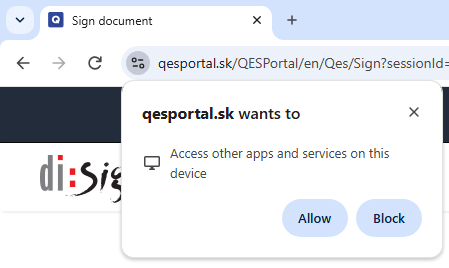
This permission is granted separately to each website that wants to communicate with the Web Signer application. When you visit a website, you can manage its permission by clicking the button to the left of its web address.
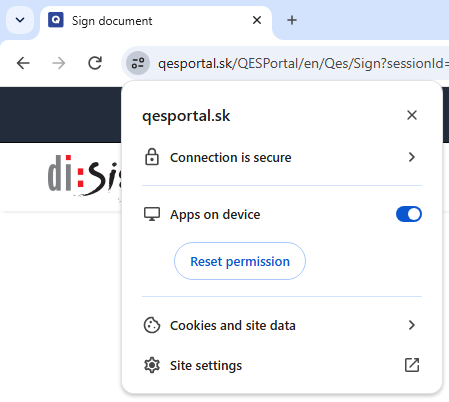
A more detailed description of this functionality can be found on the browser vendor's website.
Mozilla Firefox
Starting with version 154, Mozilla Firefox displays a dialog when communicating with the Web Signer application, in which you need to allow “Access other apps and services on this device”. Without this permission, the browser cannot communicate with the application and cannot use it to sign documents.
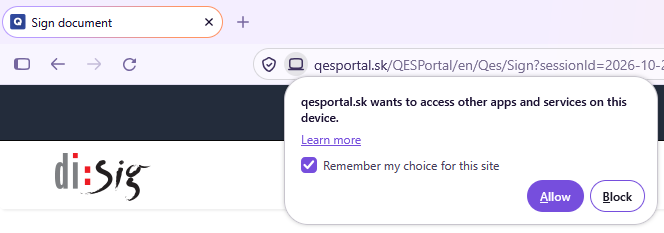
This permission is granted separately to each website that wants to communicate with the Web Signer application. When you visit a website, you can manage its permission by clicking the button to the left of its web address.
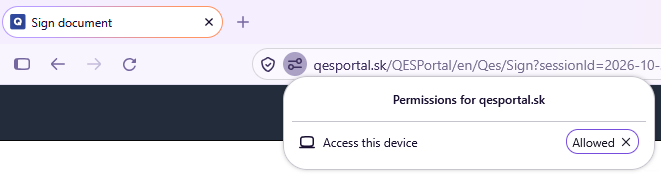
A more detailed description of this functionality can be found on the browser vendor's website.
Microsoft Edge
Starting with version 147, Microsoft Edge displays a dialog when communicating with the Web Signer application, in which you need to allow “Access other apps and services on this device”. Without this permission, the browser cannot communicate with the application and cannot use it to sign documents.
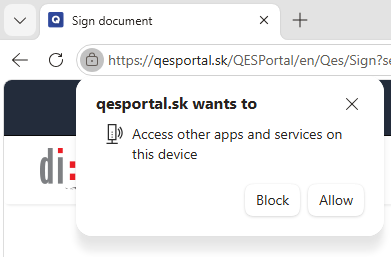
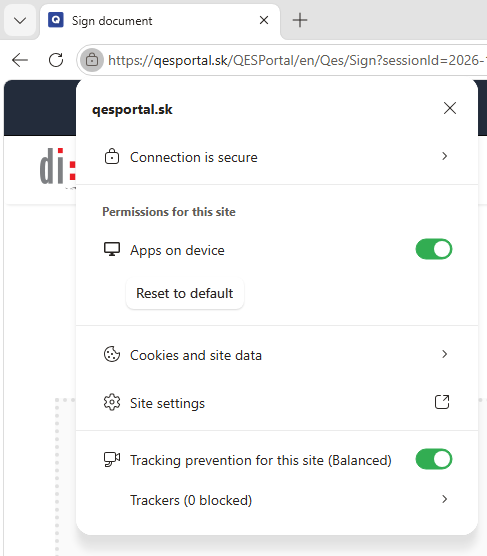
This permission is granted separately to each website that wants to communicate with the Web Signer application. When you visit a website, you can manage its permission by clicking the button to the left of its web address.
A more detailed description of this functionality can be found on the browser vendor's website.